Lastly, I would like to say thankss very much to my respected lecturer Mr Azam because give me a lot of knowledge about computer and internet :D
Friday, July 12, 2013
Lab Assignment 2 :D
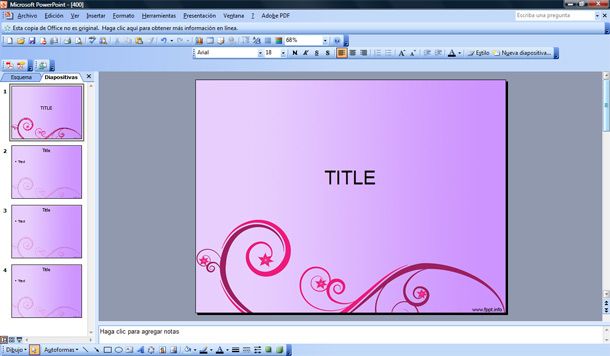
Assalamualaikum.. Now, I will story about my second lab assignment. It was about Microsoft Power Point. We have to do all the task given. We have to begin the slide with the topic MY COUNTRY. At first I was blank and did not know what to write. We have to insert video, sound, animation, SmartArt, WordArt and many more. It make me in rushing because did not have enough time. But, overall it was very awesome and wonderful taslk because I could use all the application in there.
Tuesday, June 25, 2013
Lab Assignment :D
Tuesday, June 18, 2013
MY FIFTH CLASS :D
Assalamualaikum. In this week, I learnt about basic of Microsoft Word, Microsoft Excel and Microsoft Power Point. It was quite interesting because I learnt a lot of new ways to make something.
Even though I used microsoft word often that other microsoft, but im still lack of knowledge about that system. For example I just knew about how to transparent the background the picture.
Other than that, I also learnt about Microsoft Excel. From my understanding, microsoft excel more about mathematics. We can count the question there.
At last, I learnt about Microsoft Power Point. There are lot of new information that I just knew. It was amazing if we learnt deeply.
This is the interesting part for me because I could apply always when doing my assignment. I also can increase my creativity such as create birthday card for my friends :)
Tuesday, June 11, 2013
FOURTH CLASSSS :))
Assalamualaikum. Today I would like to share about what I have learnt in my fourth class. Generally , I learnt about NETWORK. What I know about network is to connect people through something. It near to communication transmission. Apart from that, I also learnt about various types of physical media such as fiber optic cable, twisted-pair cable and many more.
the picture above is the example of network cable.
Besides, I learnt deeply about computer network such as LAN, MAN, n WAN... I got to know when we should use all of that network. Usually LAN is suitable in campus area while MAN suitable use in the city. WAN is most suitable between one country and another country.
thats all I could share about network. Last but not least, after learnt this topic I can increase my understanding about wifi in my hostel.
Tuesday, June 4, 2013
MY THIRD CLASS :))
Assalamualaikum. Yesterday I was learnt about history of the computer. From this lesson I knew who was invented the computer. There were three people who invented the computer which are Blaise Pascal, Gottfried Leibniz and Joseph-Marie Jacquard. Other than that, from what I learnt there were 5 generation of computer and has divided into two group which are high level and low level. For the first generation ( ENIAC and UNIVAC) and second generation ( transistor) as low level language. While the rest until fifth generation used higher level language. For the extra information I got, Steve Job was a founder of APPLE company which are very popular devices nowadays. For sum up about the generation of computer, the newest model is the best and have the high quality. The latest one is more application and uses that we can apply. For example, the fifth generation computer based on artificial intelligence which are the system can think and learn.
For topic computer architecture quite difficult for me because I cannot see the concept. But I try to understand as I can. For the meaning of each component make me able to understand more the process in CPU( central Processing Units). Besides, I have learnt about Categories of computer. In this part I have learnt before when my first trimester. It was quite easy to memorize and understand. There are such as embedded computer, devices computer, midrange computer and others. Each of them have their own special characteristics and the most people nowadays use in my opinion is devices computer, mobile computer and personal computer.
In addition, what is storage? from my understanding, storage is the place where can put our data or back up our data and files there. Such as Hard Disk, Pen drive, CD, and Diskette.
In this week also we learnt types of software more deeply. Even though to understand about software quite difficult, but after learnt this I can see the concept and process. For example, system software is about operation of the computer meanwhile application software is about the application we used in the computer such as game, Microsoft and programming language is enable the people to communicate or give instruction to the computer. Now I also know the most important software in all the system there is OPERATING SYSTEM( PLATFORM PROGRAMME). For Control Unit function, it will supervise or coordinate all the activities inside the CPU. From what I see in Program Development Process, I could see the types of level language. It was quite interesting and logical for me. thats all for this week. :)
For topic computer architecture quite difficult for me because I cannot see the concept. But I try to understand as I can. For the meaning of each component make me able to understand more the process in CPU( central Processing Units). Besides, I have learnt about Categories of computer. In this part I have learnt before when my first trimester. It was quite easy to memorize and understand. There are such as embedded computer, devices computer, midrange computer and others. Each of them have their own special characteristics and the most people nowadays use in my opinion is devices computer, mobile computer and personal computer.
In addition, what is storage? from my understanding, storage is the place where can put our data or back up our data and files there. Such as Hard Disk, Pen drive, CD, and Diskette.
In this week also we learnt types of software more deeply. Even though to understand about software quite difficult, but after learnt this I can see the concept and process. For example, system software is about operation of the computer meanwhile application software is about the application we used in the computer such as game, Microsoft and programming language is enable the people to communicate or give instruction to the computer. Now I also know the most important software in all the system there is OPERATING SYSTEM( PLATFORM PROGRAMME). For Control Unit function, it will supervise or coordinate all the activities inside the CPU. From what I see in Program Development Process, I could see the types of level language. It was quite interesting and logical for me. thats all for this week. :)
Tuesday, May 21, 2013
MY SECOND CLASS :D
Assalamualaikum. Now we already in week 2.. my lecturer already started teaching from topic 1. first of all, we introduced by the lecturer about learning outcome and teaching and learning method such as face to face, group discussion and many more. In this week, the topic is about computer, hardware and software. It was quiet easy for me because I have learnt before. computer is a programmable device. We also learnt about computer operation. which are from input to process to output to storage and lastly is communication. Computer also have their own characteristic such as speed, reliability, storage and many more. From my understanding, this operation is a electronic process in computer system for each things that we put in computer. Other than that, we also learnt about computer hardware and software.
This is the example of computer hardware. Hardware is a series of related instructions, organized for a common purpose. hardware also consist 5 part which are output, input, communication, storage devices and system unit.
The picture above is example of software.
Other than that, now I knew how computer represent data. I also learnt about how to count number system. There are four types of number system such as decimal, binary, octal, and hexadecimal number systems. In this part, we learnt how to convert from another number system to another number system. It was quite easy because Mr Azam taught us wisely until all students understand. That is all me and my friends were learning in this week. I hope the chapter after this will more easy. :)
Wednesday, May 15, 2013
MY FIRST COMPUTER N INTERNET CLASS :))
Assalamualaikum.. so, this is my second entry for this trimester.. In week 1, firstly the lecturer asked us to introduce our self by saying name,country and course has been taking last trimester. It was quite interesting but shy. after that, the lecturer just introduced about this course and the assignments that I will do later. while we overview the course, we have told about assignment mark. It quite easy but afraid of losing mark. In the evening class, Mr Azam asked us to write short essay about "My level of knowlegde in ICT". The key point of this essay already given such as since when we know about computer, what is the software that we always use, our favourite webpage and many more. We have to submit it. If we compare my essay and with my friends, my essay quite short because I think I should not tell everything detail. I just follow the key point. I hope my essay will satisfied my lecturer.
Tuesday, May 14, 2013
COMPUTER N INTERNET :))
Friday, March 29, 2013
Thursday, March 28, 2013
INFORMATION ANALYSIS- WEEK 9 :)
Assalamualaikum. Today I will write about Information Analysis. Honestly, I did not understand what actually it is..From what I have read.. It is about Internet sources. There are 7 types of criteria for evaluating Internet Sources. Firstly, PURPOSE.
PURPOSE- we talk about what is the purpose of the resource ? Does the resource fullfill the stated purpose? A good resource will not be ambiguous and will not deflect potential users, due to its poor communication of purpose.
SCOPE- What subject is covered? Does the resource cover a subject adequately?
-breadth > Depth > Time > Format
AUTHORITY- Institution- Is the publisher a recognizes organization?? Does the address specifically the domain, suggest the perspective from which the site was designed and does this suit our purpose ?
-for example : ".edu," ".com," ".gov," respectively imply education, commercial and government origins.
-Author-is it author ? or producer identifiable? Can the author be contacted for clarifications ?
-Resource - Is the information credible and of high quality? Is the information objective ? How long has a resource been available? Is the information verifiable ?
AUDIENCE- Who are the intended users of this resource? Does your user group correspond to the intended audience ?
CRITERIA OF INFORMATION ANALYSIS
INFORMATION CONTAIN-
1)Accuracy - it will tell us is the information in the resource accurate ? Is this origin of the content documented? Are there political or ideological biases?
Objective, correct, referenced or professionally sponsored information is a mark of accuracy.
2) Currency - Ask us Is the resource static or reliant on regular updating ? Can you rely on this source over time to provide up-to-date information?
How current is the material included in each update
3) Uniqueness- Is the resource original, or has it been derived from other sources? Is the information in this resource available in other forms( gopher,WWW,print, CD-ROM)?
A particular site may not be available when required, and an alternative or mirror site may have to be used, also redundancy may be valuable on the internet.
4) Quality of writing - Is the text well written ?
5) Design and layout- ORGANIZATION - are the resources well organized and logically presented?
There are still many types of criteria such as content,workability,connectivity, graphic and multimedia design and browsability and organization that have their own illustration.
Monday, March 25, 2013
APA CITATION - WEEK 8 :)
Assalamualaikum. Today we are in week 8. Topic in week 8 is about APA citation. There are three sources of integration : QUOTATIONS, PARAPHRASES and SUMMARIES.
First, I would like to explain about
Quotations
use the author's words exactly and use quotation mark only for short quotation.
- we cannot use if more than 40 words.
-give the year of publication in parentheses after the writer's name and page number at the end of the quotation.
- do not forget to put a period AFTER the parentheses not before.
-must be identical to the original. There are example of quotation from book that I got from notes.
Paraphrasing
-it involves putting a passage from source material into your own words. It also attribute paraphrases to their original sources. It usually shorter than, but may same length with original passage.
- As an alternative to direct quotation. This is the example for paraphrasing.
Summarizing
- put the main ideas into your own words. besides, summarized ideas must be attributed to the original source.
-summaries are significantly shorter than the original.
-use your own words and do not use quotation marks.
- state only the most important idea or fact and use a few words as possible.
Thursday, March 14, 2013
CITATION, BIBLIOGRAPHY AND REFERENCE - WEEK 7 :)
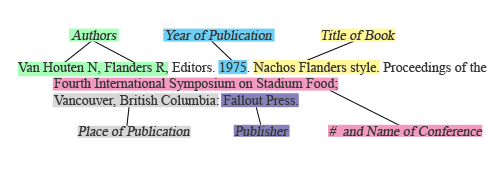
Assalamualaikum~ How are you today ? I would like to story about bibliography or reference. Firstly, what is citation, bibliography and reference ? Bibliography or we can call reference is a list of books & other materials which have some relationship to each other. The material list have following component such as
Author
Title
Place of publication
Publisher
Year of publication .
From my understanding, all of this must have to make a book as a reference. All the things that relate with a book have to write down. For example
In this topic, I also learnt about about plagiarism. Plagiarism is a person who copy or using others' idea and words without clearly acknowledging the source of the information. If we want to take image, sound, words that are not our's, we have to give a credit for the owner.
We change to another topic, that is a citation and documenting information source. I have learnt what is important of APA report. APA is stand for American Psychological
Association. There a several of function for APA style. Such as : TERM PAPERS, RESEARCH REPORTS, EMPIRICAL STUDIES and many more. There are 3 rules for APA style which are TITLE , AUTHOR , DOCUMENTATION. For Documenting Author, have several ways to write depends on amount of author of that book. Let say in 1 book have 2 author, we can write like this : Stewart, T., & Biffle, G. (1999). But if the author more than 6, we just add { et. al } after the sixth author's name.
RULES FOR TITLE are :
1. we have to capitalize only the first letter in each words, title or subtitle.
2. Underline or
italic the Title of books, Title of Journal, Title of
Magazines, Title of newspaper.
There are many type rules for documentation such as :
- Arrange in alphabetical order
- Do not put the number/bullet in bibliography/reference
- single space
- use hanging indent (1/2 inch)
There are some example for bibliography for journal and conference proceeding.
Thursday, February 28, 2013
TRUNCATION AND WILDCARD - WEEK 6
The second topic is
about wildcard, it is a special character such as an asterisk (*), question
mark (?), or pound sign (#), that replaces one or more letters in a word. It usually presents a single character.
Wildcard used in the middle of a word
to match usually known variants of a term. For example, we can put
question mark at the middle of word: WOM? N , and it will give us several of
words such as women, or woman.
Finally in this
week, I have learnt about phrase searching. It when you use a string of words
(instead of a single word) to search with. For example, when we give two words
that have 1 meaning, it will give a meaning for each word. For the database to
understand your search, you should put your phrase between brackets ( )
or inverted commas ".
Type your search as
follows:
“Information literacy" or (information literacy)
Thursday, February 21, 2013
BRAINSTORMING FOR SEARCH TERM & BOOLEAN OPERATORS- WEEK 5
Assalamualaikum. Today I will talk about what I have learnt in week
5. Big topic for this week is brainstorming for search term. What I understand
about this topic, they teach us how to search information easily using keyword
or subject heading and so on. Firstly, when we should using keyword? When you're first
starting to formulate your research question, it can be useful to brainstorm
keywords that are synonymous with or related to the major concepts of your
topic, as well as narrower and broader terms. Subject heading usually will
give you specific information about the book that you search. There are many
types of subject heading such as Library subject heading, Science subject
heading, or Thesaurus Psychological Index term.
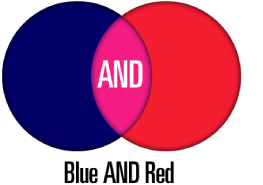
In addition, we have learnt about BOOLEAN OPERATORS. From my understanding, word for Boolean was got from the name of mathematician there was George Boole. There are combining terms AND, OR, NOT. Boolean Searching : this allows us to group words together in an electronic database or environment such as WWW (world Wide Web). Each words will come out with different results. This is the most common and basic strategy.
AND
By using
an AND between words you limit the search.
OR
By placing
an OR between words it expands the search.
When you use OR you receive more information because the search engine is looking for two words rather than just one word.
NOT
'not' operator which allows you to exclude words from the search.
If a document has a word that you would like to search but that document also contains another word that you do not want to retrieve, then it will exclude that document from you search query results.
Thursday, February 14, 2013
SEARCH TOOL : ONLINE DATABASES - WEEK 4
Assalamualaikum.. Today I will write my reflection on week 4.. What I learnt in week 4 was about online databases and their example. What I knew about this is online databases is search engine tool that can occurs as simple screen or advance screen. This is the example of simple screen.
ONLINE DATABASES - subject , keyword, full text
We can access online Database through our own library portal. We try to click DAtabase on trial and they will give us intruction to go far.
Subscribe to:
Posts (Atom)
.jpg)
.jpg)